Media Analyzer

Real-Time Video Analysis Platform

System Architecture

View Full
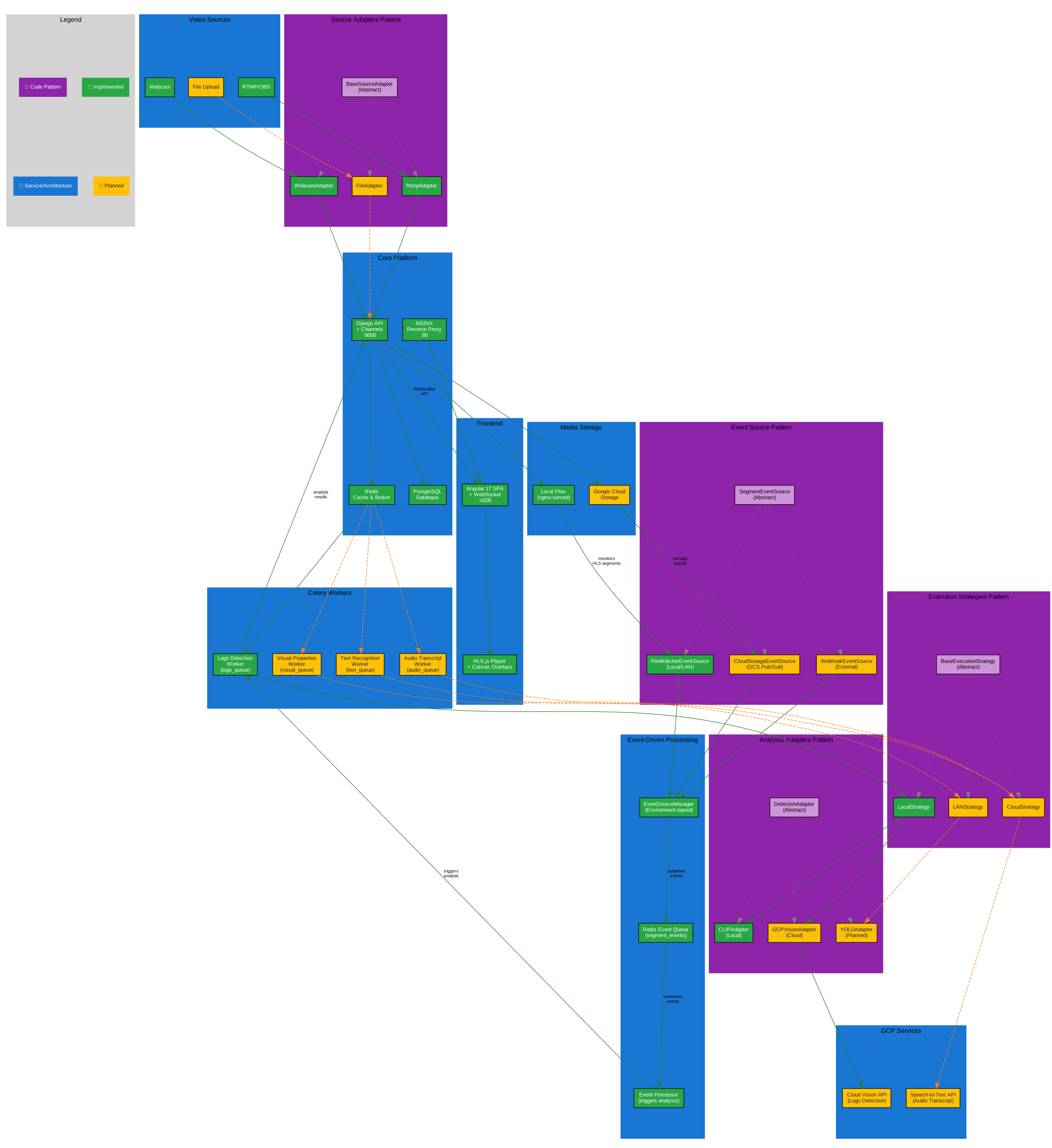
System Architecture Diagram

Complete system overview showing video ingestion, AI processing pipeline, and real-time dashboard components.

Components

  • Video Ingestion: RTMP streams from OBS, FFmpeg HLS conversion
  • AI Processing: CLIP/YOLO for logo detection and scene analysis
  • Real-time Communication: Django Channels WebSocket for live updates
  • Frontend: Angular 17+ with HLS.js video player and Canvas overlays

Key Features

Video Streaming

  • RTMP ingestion from OBS Studio
  • FFmpeg HLS conversion
  • Event-driven segment detection
  • WebSocket-powered live updates

AI Analysis

  • Logo/brand detection (CLIP)
  • Object detection (YOLO)
  • Real-time vs batch processing modes
  • Switchable local/cloud backends

Infrastructure

  • Docker containerized services
  • Kubernetes orchestration
  • GCP integration (Storage, Vision)
  • Celery task queue with Redis

Technology Stack

Backend

  • Django + Channels
  • Django REST Framework
  • PostgreSQL
  • Celery + Redis
  • FFmpeg

AI/ML

  • OpenCV
  • CLIP (scene analysis)
  • YOLO (object detection)
  • Hugging Face Transformers
  • GCP Vision API

Frontend

  • Angular 17+
  • HLS.js video player
  • Canvas overlays
  • WebSocket client
  • Standalone components

Architecture Goals

Event-Driven Design

File system watchers detect new HLS segments, triggering AI processing and real-time WebSocket notifications.

Scalable Processing

Celery workers handle AI tasks with configurable queues for real-time vs batch processing modes.

Cloud-Native

Kubernetes manifests for local (KIND) and production (GKE) deployment with easy environment switching.